Is Cursor Free? 7 Things to Know About Cursor’s Free Plan
Cursor is the AI code editor everyone is either using or asking about — a VS Code fork with AI chat, tab completions, and agent mode built directly into the editing experience. And unlike some of its competitors, the answer to “is Cursor free?” is a genuine yes: Cursor ships a free Hobby plan that requires no credit card and gives you the full editor.
But “free” comes with asterisks. The Hobby tier is deliberately limited, Cursor’s credit-based billing confuses almost everyone at first, and the free allowance runs out fast for active developers. This guide covers exactly what the free plan includes, what the paid plans cost in 2026, how the credit system actually works, and when upgrading makes sense. For the broader “is it free” landscape, see also whether ChatGPT is free, whether Gemini is free, and Midjourney’s free situation.
Is Cursor Free? The Quick Answer
Cursor’s Hobby plan is completely free, no credit card required. You get:
- The full Cursor editor (a fork of VS Code) with all core features
- Limited AI tab completions each month (roughly 2,000 completions)
- A capped number of agent/premium model requests (around 50 slow premium requests per month)
- A one-week Pro trial when you first sign up — full Pro features, no payment required
That makes Cursor one of the few top-tier AI coding tools with a genuinely usable free entry point. For comparison, Claude Code — its closest competitor — has no free tier at all and starts at $20/month. If you are evaluating both, the free Hobby plan is the obvious way to try Cursor before spending anything.
2. What the Free Hobby Plan Actually Includes
The Hobby tier is best understood as an extended evaluation, not a permanent home for daily development. Here is what you get and where the walls are:
| Included | The limit |
|---|---|
| Full Cursor editor application | None — the editor itself is fully featured |
| AI tab completions | Limited monthly allowance (~2,000 completions) |
| Agent mode requests | Limited; premium model requests capped (~50/month, served on slower infrastructure) |
| Codebase indexing and chat | Included within the request limits |
| One-week Pro trial | 7 days from signup, then reverts to Hobby limits |
In practice, a developer coding a few evenings a week will find the free tier comfortable for two or three weeks, then start hitting walls: completions throttled, agent requests queued on slow infrastructure, premium models unavailable. Active daily developers typically exhaust the monthly allowance within one to two weeks. That is by design — the Hobby plan is a funnel to Pro, and it is an honest one.

3. The One-Week Pro Trial: Use It Deliberately
Every new signup gets seven days of Pro: unlimited-feeling completions, full agent mode, frontier models, cloud agents. It is the best way to evaluate Cursor, but only if you use the week intentionally:
- Build something real. Do not just poke at the chat — run a genuine work task through agent mode so you feel the actual workflow.
- Test the credit-relevant behaviors. Try both Auto mode and manually selecting a frontier model, so you understand what the paid credit system feels like before you pay.
- Note when you hit limits after the trial. The gap between your trial week and your first Hobby-capped week tells you exactly which paid tier you would need.
The trial requires no credit card, so there is nothing to cancel and no surprise charge. When it ends, you simply drop to Hobby limits.
4. Cursor’s Paid Plans in 2026
Cursor restructured its pricing in June 2025, and most older guides still show the old numbers. The current lineup has six tiers:
| Plan | Price | Best for |
|---|---|---|
| Hobby | Free | Evaluating Cursor, light use |
| Pro | $20/month (~$16/month billed annually) | Most individual developers |
| Pro+ | $60/month | Heavy users who exhaust Pro credits |
| Ultra | $200/month | Power users coding with AI all day |
| Teams | $40/user/month | Teams needing SSO, admin controls, centralized billing |
| Enterprise | Custom | Large orgs with compliance needs, pooled usage |
Annual billing saves roughly 20% across paid plans. Pro at $20/month is the sweet spot for most solo developers — it unlocks frontier models, MCPs, cloud agents, and Bugbot, plus a $20 monthly credit pool (more on that below). Pro+ triples the credits; Ultra is the 20x tier for all-day AI pair programming.
5. The Credit System: The Part That Surprises Everyone
Here is the thing that trips up new subscribers. Since June 2025, Cursor runs on a dollar-denominated credit pool:
- Every paid plan includes a monthly credit balance equal to its price (Pro = $20 of credits, Pro+ = $60, Ultra = $200).
- Auto mode is unlimited on every paid plan. When Cursor picks the model for you, you never touch the pool.
- Credits deplete only when you manually select a frontier model (like Claude Sonnet or a GPT model) — each request draws from the pool at that model’s API rate.
Three behaviors drain credits fast: manually selecting premium models for everything, enabling max mode, and working across large codebases that stuff many files into each prompt. Stay in Auto mode and most developers never empty the pool; hand-pick Claude Sonnet for every task and you can burn through Pro’s $20 in credits mid-month, triggering overage charges on top of the plan price.
This is the single most important thing to understand before subscribing: your real bill can exceed the plan price if you fight the Auto mode. Cursor’s own estimate puts daily Agent users at $60–100/month in total spend. The system rewards trusting the default and penalizes micromanaging model selection.

6. Cursor vs. Claude Code: Free Tier Showdown
The two leading AI coding tools take opposite approaches to free:
| Cursor | Claude Code | |
|---|---|---|
| Free tier | Yes — Hobby plan, genuinely free | No — paid Claude plan required |
| Entry price | $0, then Pro at $20/month | Pro at $20/month minimum |
| Approach | IDE-first: you drive, AI assists inline | Agent-first: terminal agent, you review |
| Models | Claude, GPT, Gemini, others | Claude family only |
| Billing | Credit pool + overages possible | Flat subscription with usage windows |
If your budget is zero, Cursor wins by default — Claude Code is not an option. If you are choosing between paid tiers, the decision is about workflow, not price: Cursor for developers who live in the editor and review every line, Claude Code for autonomous multi-file refactors and background agents. Many developers end up using both.
7. Five Ways to Make the Free Tier Last Longer
- Ration agent requests for hard problems. Use tab completions (plentiful) for boilerplate and save agent requests for genuine problem-solving.
- Batch your questions. One well-specified agent request beats five vague ones — each round trip costs allowance.
- Use the Pro trial week strategically. Do your heaviest evaluation during the trial; coast on Hobby after.
- Learn the keyboard-first workflow. The faster you work with completions alone, the less you lean on agent requests.
- Track the monthly reset. Know your cycle date. Heavy tasks scheduled just after reset feel unlimited; the same tasks at month-end feel throttled.
When Should You Upgrade to Pro?
The upgrade math is simple: if you hit Hobby limits more than twice in a month and the throttling costs you real flow, Pro pays for itself immediately. At $20/month (or ~$16 annual), it is priced against a single hour of developer time — one saved debugging session covers the month.
Move from Pro to Pro+ when you consistently exhaust Pro’s credit pool before month-end — meaning you are manually selecting frontier models often enough that the $20 pool does not last. For most developers, that day never comes; Auto mode keeps them comfortably inside Pro. Teams should evaluate the Teams tier when they need SSO, usage analytics, and centralized billing rather than for raw capacity.
Cursor’s Standout Features Worth Knowing
The free tier is the hook, but the features are why people stay. A tour of what makes Cursor more than “VS Code with a chatbot”:
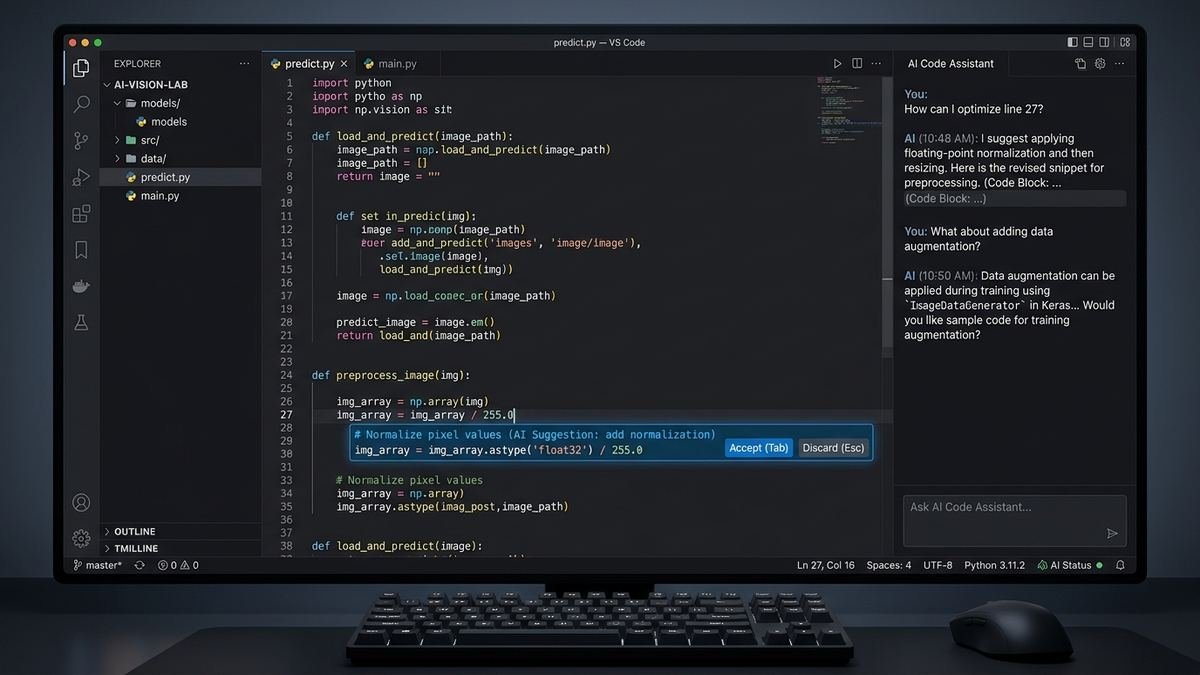
- Tab completions. The signature feature: ghost-text suggestions as you type, aware of your entire project — not just the current file. It learns your patterns fast enough that within days it is completing whole functions the way you would write them. This alone is worth the install, and it is the feature free-tier users lean on most.
- Agent mode. Describe a task in plain language and the agent plans, edits multiple files, runs terminal commands, and iterates. “Add pagination to the users endpoint with tests” becomes a multi-file change set you review rather than a manual slog. This is where the premium request budget goes.
- Composer. Multi-file editing driven from chat: propose a change in conversation, watch it apply across files with inline diffs you accept or reject individually. It bridges the gap between chatting about code and changing code.
- Codebase indexing. Cursor builds a semantic index of your project on startup, so @-mentions of files, functions, or symbols pull in exactly the right context. Answers about “how does auth work here” are grounded in your actual code, not generic advice.
- MCP support. Model Context Protocol integrations let Cursor talk to external tools — databases, issue trackers, documentation — extending the agent beyond the codebase.
- Bugbot and code review. Automated review that catches bugs and suggests fixes on your diffs, like a tireless junior reviewer on every pull request.
- Cloud agents. Offload long-running agent tasks to Cursor’s cloud instead of your laptop — start a refactor, close the lid, review the result later.
Not every feature matters to every developer, but the combination is why Cursor crossed $3 billion in annualized revenue: it is not one AI trick, it is an entire AI-native editing workflow.
Cursor for Students, Hobbyists, and Teams
Different users should think about Cursor’s pricing differently:
- Students and hobbyists: The Hobby tier is genuinely enough for coursework and side projects. The monthly reset plus the trial week covers a semester’s worth of light use. If a project sprint needs more, one month of Pro ($20) is cheaper than most textbooks.
- Solo professionals: Start on Hobby, upgrade to Pro the second month if limits bite. The $20 is trivially justified by a single saved hour. Annual billing (~$16/month effective) makes sense once you are committed.
- Teams: The Teams tier ($40/user/month) is not about more AI — it is about administration: SSO, usage analytics, centralized billing, and enforced privacy controls. Evaluate it when “who is using what” becomes a management question, not before.
- Enterprises: Custom pricing with pooled usage, audit logs, and dedicated support. The conversation here is about compliance and procurement, not per-seat math.
The common thread: let usage dictate the tier. Cursor’s structure is explicitly designed as a progression — Hobby to Pro to Pro+ to Ultra — and fighting that progression (buying Ultra on day one, or clinging to Hobby while throttled) just costs money or time.
Cursor Privacy and Data: What Happens to Your Code
An AI editor reads your code — all of it. Understanding Cursor’s data handling matters, especially on the free tier:
- Codebase indexing is local-first. The semantic index of your project is built on your machine. When you make AI requests, relevant snippets are sent to the model provider to generate responses — unavoidable for any cloud AI feature.
- Privacy mode exists. Cursor offers a privacy mode that changes data retention behavior; teams with strict requirements should verify the current policy on cursor.com rather than relying on memory, since these policies evolve.
- Teams and Enterprise add controls. Centralized administration, enforced privacy settings, and audit trails are the reason the Teams tier costs 2x Pro — it is governance, not capacity.
- The practical rule. Do not paste secrets, credentials, or regulated data into any AI tool — Cursor included — unless you have verified the data handling terms for your plan. Use environment variables and secret managers so there is nothing sensitive in the codebase for the indexer to find in the first place.
For most individual developers this is a non-issue. For teams in regulated industries, it is a procurement conversation — which is exactly what the Enterprise tier is for.
Frequently Asked Questions
Is Cursor really free, or is there a catch?
It is really free — the Hobby plan costs $0 with no credit card. The “catch” is just limits: capped completions and agent requests each month, with premium requests served on slower infrastructure. It is an evaluation tier, not a permanent free ride for heavy use.
How many free requests does Cursor give per month?
Roughly 2,000 tab completions and around 50 slow premium model requests per month on Hobby, plus a one-week Pro trial at signup. Exact numbers shift periodically — check Cursor’s pricing page for the current allowance.
Do I need a credit card for the free plan?
No. The Hobby plan and the one-week Pro trial both work without payment details.
What happens when I run out of free requests?
Completions and agent requests get throttled or paused until the monthly reset. You can upgrade to Pro at any point to restore full speed.
Is Cursor’s free plan better than Claude Code’s?
Cursor has a free plan and Claude Code does not, so yes by default. They are different tools though — Cursor is an editor you drive, Claude Code is an agent that drives. The free tier is the perfect way to learn which workflow fits you.
Can my real bill exceed the $20 Pro price?
Yes. Pro includes a $20 credit pool, and manually selecting frontier models draws from it — exhaust it mid-month and overage charges apply. Stay in Auto mode (unlimited on paid plans) to keep the bill at exactly $20.
Final Thoughts
Yes, Cursor is free — the Hobby plan is a genuine, no-credit-card free tier with the full editor, limited AI completions, and a one-week Pro trial to show you what you are missing. For light use and evaluation, it is all you need; for daily development, the limits arrive within weeks and Pro at $20/month is the natural step.
The thing to watch is the credit system: Auto mode is unlimited on paid plans, but hand-picking frontier models draws from a dollar-denominated pool that can push your bill past the plan price. Understand that mechanic, start free, and let your actual usage — not the marketing — decide your tier. Check the current numbers on cursor.com/pricing before you subscribe, and enjoy the rare sight of a top-tier AI coding tool with a free tier worth using.