What Is Amazon SageMaker? The Complete Guide to AWS Machine Learning
Machine learning has a dirty secret: building the model is the easy part. The hard part is everything around it — provisioning GPU servers, managing training jobs, versioning experiments, deploying endpoints that stay up, and monitoring them in production. Amazon SageMaker exists to absorb all of that undifferentiated heavy lifting.
This guide explains what SageMaker is, how it works, what changed with the SageMaker AI rebrand, who should use it, and what it costs — so you can decide whether it belongs in your stack.
What Is Amazon SageMaker?
Amazon SageMaker is a fully managed machine learning platform on AWS for building, training, and deploying ML models at scale. It gives data scientists and developers managed infrastructure for every stage of the machine learning lifecycle — from experimentation notebooks to production endpoints — without requiring them to manage servers.
Launched at AWS re:Invent in November 2017, SageMaker has grown into one of the most comprehensive ML platforms in the cloud. In December 2024, AWS renamed it Amazon SageMaker AI and folded it into a next-generation unified platform spanning data, analytics, and AI — but the core promise is unchanged: you focus on models, AWS handles the machinery.
The official starting point is the Amazon SageMaker product page, with the technical deep-dive in the SageMaker developer guide.
A Brief History: From 2017 to SageMaker AI
- November 2017 — SageMaker launches at re:Invent: managed notebooks, training jobs, and hosted endpoints in one service.
- 2018–2023 — Steady expansion: built-in algorithms, automatic model tuning, edge deployment (SageMaker Edge), MLOps tooling (Pipelines, Model Registry), and managed notebook evolution into SageMaker Studio.
- December 2024 — AWS announces the next generation of SageMaker and renames the ML service to SageMaker AI. The new platform unifies ML with analytics (Lakehouse), data and AI governance, SQL analytics, data processing, a Unified Studio experience, and Amazon Bedrock for foundation models.
- December 2025 — New serverless customization in SageMaker AI interfaces with models like Amazon Nova, Llama, Qwen, DeepSeek, and GPT-OSS.
The important nuance: the 2024 rename changed the product’s place in a larger platform without changing existing sagemaker APIs, CLI commands, or resource names. Your old training scripts still work.
How SageMaker Works: The ML Lifecycle
Every SageMaker project follows the same arc:
- Develop — Explore data and prototype in notebooks or SageMaker Studio.
- Train — Launch managed training jobs against data in S3; SageMaker provisions the compute, runs your code, and tears it down.
- Tune — Automatic model tuning (hyperparameter optimization) searches configurations in parallel.
- Deploy — Push the model artifact to a hosted endpoint: real-time, serverless, or batch.
- Monitor — Track data quality, model quality, and bias drift in production; retrain on schedule.
The through-line: at no point do you SSH into a GPU box, install CUDA drivers, or write your own job scheduler. That is the entire value proposition.

Core Components, Explained
| Component | What it does |
|---|---|
| SageMaker Studio / Unified Studio | Web-based IDE for the full ML workflow |
| Notebook instances | Managed Jupyter notebooks for experimentation |
| Training jobs | Managed, distributed model training on S3 data |
| Built-in algorithms | Pre-built XGBoost, linear learner, image classification, and more |
| Automatic model tuning | Parallel hyperparameter search |
| Real-time endpoints | Always-on HTTPS inference endpoints with autoscaling |
| Serverless inference | Pay-per-invocation endpoints for sporadic traffic |
| Batch transform | Offline inference over large datasets |
| Pipelines & Model Registry | MLOps: versioned, repeatable training and deployment workflows |
| Ground Truth | Managed data labeling workforce integration |
Two components deserve emphasis for newcomers. Training jobs are the heart of SageMaker: you point at data in S3 and a training script, pick an instance type, and SageMaker handles distribution, checkpointing, and spot-instance management. Endpoints are the payoff: one API call deploys your model behind an autoscaling HTTPS endpoint — no containers to babysit.

SageMaker AI vs Classic SageMaker: What Actually Changed
If you learned SageMaker before 2024, here is what is different:
- Unified Studio brings notebooks, SQL analytics, data processing, and Bedrock foundation-model access into one interface, instead of separate consoles.
- Lakehouse architecture unifies data access across S3 data lakes and warehouses, so training data and analytics data stop living in silos.
- Integrated governance covers data and AI assets together — lineage, access control, and compliance in one place.
- Bedrock alongside SageMaker means you can mix foundation-model APIs (for generative AI) with classic SageMaker training (for custom models) in one platform.
For existing users: nothing was taken away. For new users: you get a broader platform than the SageMaker of 2020, which is both more powerful and more to learn.
Who Should Use SageMaker?
SageMaker is ideal for:
- Teams training custom models regularly who are tired of managing GPU infrastructure
- Organizations already on AWS (data in S3, identity in IAM — SageMaker slots straight in)
- Regulated industries needing VPC isolation, encryption, audit trails, and compliance certifications
- MLOps-mature teams wanting pipelines, registries, and monitoring as managed services
SageMaker is probably overkill for:
- A single notebook experiment — start with a local notebook or a SageMaker notebook instance, not the full platform
- Pure LLM API usage — if you just need to call a foundation model, Bedrock or a direct model API is simpler
- Tiny teams with no AWS footprint — the learning curve and billing complexity are real
A useful middle path: prototype locally, train on SageMaker when you need scale, and only adopt the full MLOps stack when you have models in production worth governing.
SageMaker Pricing: How Much Does It Cost?
SageMaker follows AWS’s pay-as-you-go model: you pay per second for the compute instances your jobs and endpoints use, priced by instance type and region. There is no platform subscription fee.
Want to learn the Databricks platform free first? Our Databricks Community Edition overview covers the no-cost workspace.
What does that mean in practice?
- Experimentation is cheap. A managed notebook instance costs cents per hour; training a small model on a CPU or modest GPU instance for an hour costs a few dollars.
- Research-scale work is affordable. Training on the order of a hundred small-to-medium models on a dataset under 10GB can cost under $20 — genuinely accessible for academic and side projects.
- Production endpoints are the real bill. A real-time endpoint runs 24/7, so a GPU-backed endpoint can cost hundreds per month per instance before autoscaling. This is where serverless inference earns its keep for spiky traffic.
- Data transfer, storage, and labeling (Ground Truth) bill separately.
Cost discipline essentials: use spot/managed spot training (up to ~70% cheaper for fault-tolerant jobs), shut down notebook instances when idle (they do not auto-stop by default in every configuration), prefer serverless inference for sporadic traffic, and set AWS billing alerts from day one. SageMaker’s built-in cost tracking helps, but only if someone looks at it.

SageMaker vs the Alternatives
SageMaker vs raw EC2 with your own setup. Amazon EC2 gives you the same GPUs with zero ML abstraction — cheaper per hour, but you own everything: drivers, scheduling, scaling, deployment. Choose EC2 if you have the MLOps expertise in-house and want maximum control; choose SageMaker if you would rather pay AWS to own the plumbing. Our Amazon EC2 guide breaks down the compute side in detail.
SageMaker vs Bedrock. Bedrock is for using foundation models via API; SageMaker AI is for building and training models (and now hosts both under one roof). Many 2026 architectures use both: Bedrock for generative features, SageMaker for custom-trained models.
SageMaker vs Vertex AI / Azure ML. The honest answer is ecosystem gravity: if your data and identity live on AWS, SageMaker’s integration advantage is decisive. Feature-for-feature the three clouds are comparable; migration cost is the real differentiator.
SageMaker vs open-source stacks (Kubeflow, etc.). Open source is free in license and expensive in engineering time. SageMaker inverts that. Teams with strong platform engineering sometimes win with open source; everyone else usually spends more than the SageMaker bill in salary.
Getting Started: Your First SageMaker Project
A sensible first project that teaches the whole lifecycle in an afternoon:
- Create a notebook instance (or open Unified Studio) in your AWS region.
- Load a small tabular dataset into S3 — the classic Iris or Titanic datasets are fine.
- Train with a built-in algorithm — XGBoost via SageMaker’s first-party container, a dozen lines of SDK code.
- Run automatic model tuning on two hyperparameters to see the search in action.
- Deploy to a serverless endpoint and invoke it from a Python script.
- Delete everything and check the billing console — learning what each step cost is part of the lesson.
The SageMaker developer guide has step-by-step tutorials for exactly this flow. Budget $5–10 for the experiment and you will understand the platform better than any whitepaper can teach.
Also Worth Reading in AI
SageMaker sits at the applied end of the AI spectrum — but the field moves fast on every front:
- Our Gemini API pricing guide covers the pay-per-token economics that increasingly compete with training your own models.
- If you are weighing build-vs-buy for AI assistance generally, ChatGPT vs Copilot maps the assistant landscape.
- And for a sense of where the hardware underneath all of this is heading, see the latest quantum computing breakthroughs — still research-stage, but the trajectory matters for long-horizon ML planning.
Frequently Asked Questions
Is Amazon SageMaker free?
There is no free tier in the traditional sense, but costs scale with usage — small experiments cost dollars, not hundreds. Some regions and account types include limited free-tier-eligible resources; check current AWS free tier terms.
What is the difference between SageMaker and SageMaker AI?
SageMaker AI is the December 2024 rename of the ML service, now positioned inside a broader unified data/analytics/AI platform. Existing APIs and resource names did not change.
Do I need to know machine learning to use SageMaker?
For the full platform, yes — it is a tool for practitioners. But features like JumpStart (pre-trained models) and Canvas (no-code ML) lower the bar for specific use cases.
Can SageMaker deploy models to edge devices?
Yes — SageMaker Edge Manager (part of the platform’s edge capabilities) packages and deploys models to edge devices and embedded systems.
How does SageMaker handle data security?
Encryption in transit and at rest, IAM-based access control, VPC isolation for training and endpoints, and compliance with major industry standards. Regulated workloads are a core use case.
SageMaker vs EC2 for training — which is cheaper?
Raw EC2 is cheaper per GPU-hour; SageMaker adds a managed-service premium. The total-cost comparison depends on how much engineering time you would otherwise spend on infrastructure — for most teams without dedicated MLOps, SageMaker wins on total cost.
Final Thoughts
Amazon SageMaker’s pitch has not changed since 2017, even as the product grew from a training service into the SageMaker AI platform: your team should spend its hours on models and data, not on GPU drivers and job schedulers. It is not the cheapest way to run a single experiment, and it is not the simplest way to call an LLM API — but for organizations training, deploying, and governing machine learning models on AWS, it remains the default answer. Start with the official product page, run the $5 first project above, and let the billing console teach you the rest.
SageMaker Studio: A Closer Look
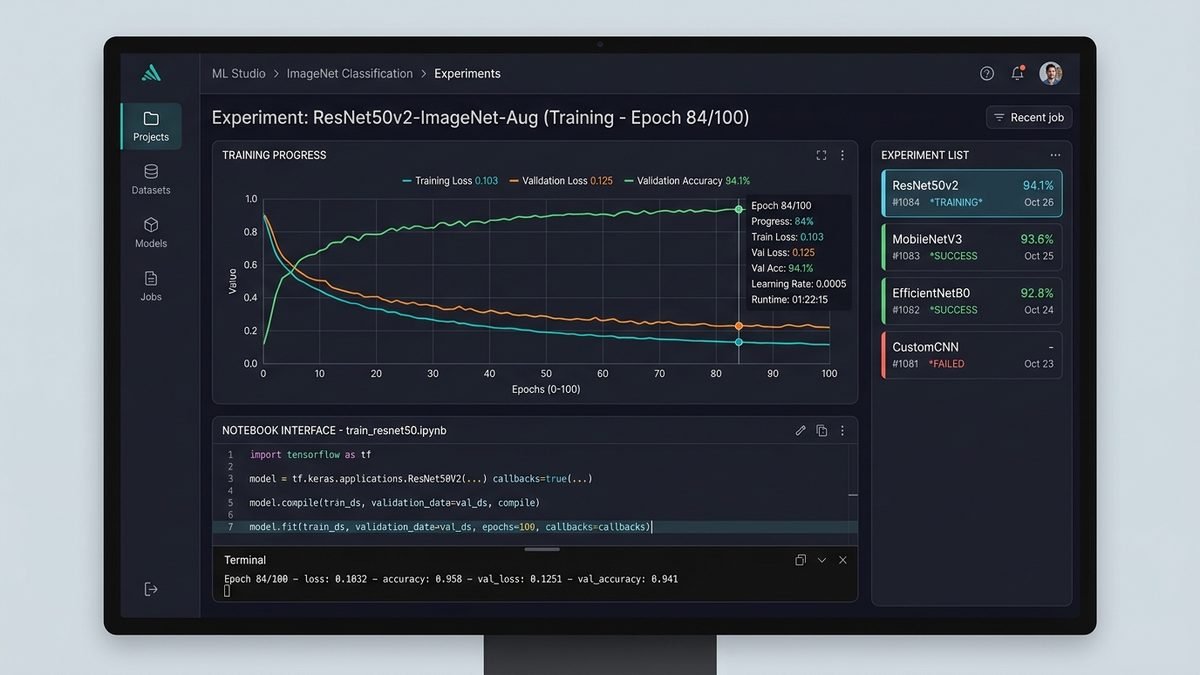
If SageMaker is the platform, Studio is where you live in it. The web-based IDE bundles notebooks, terminals, experiment tracking, and debuggers into one interface — no local setup, with your code persisted to EBS and your compute scaling independently of the interface.
The 2024-era Unified Studio goes further, adding SQL analytics, data processing (Spark), and Bedrock foundation-model playgrounds alongside classic ML tooling. For a data team, this ends the era of five browser tabs across three consoles. For a solo practitioner, it can feel like a lot — you are allowed to ignore the parts you do not need. Open a notebook, train a model, close the tab; the rest of the platform waits patiently.
One practical tip: Studio applications (KernelGateway, JupyterServer) bill while running. Get in the habit of stopping them — or better, configure lifecycle scripts that shut down idle kernels automatically. “I left Studio running over the weekend” is the most common first-month billing surprise in SageMaker.
MLOps Done Properly: Pipelines, Registry & Monitoring
Models rot. Data drifts. Code that trained last quarter’s champion silently breaks on this quarter’s data. SageMaker’s MLOps tooling exists for exactly this:
- SageMaker Pipelines — versioned, repeatable workflows: preprocess → train → evaluate → register → deploy, defined as code and re-runnable on schedule or trigger.
- Model Registry — every trained model versioned with its metrics, artifacts, and approval status. “Which model is in production, and what data trained it?” becomes a query instead of an archaeology project.
- Model Monitor — continuous checks on data quality, model quality, and bias drift against baselines, with alerts when production diverges from training.
- Feature Store — a managed repository for ML features so training and serving consume identical definitions (eliminating the classic train/serve skew bug).
You do not need all of this on day one. The adoption curve that works: manual training → scripted training → Pipelines → Registry → Monitor. Each step pays for itself the first time it catches something — a silently degraded model, an untracked experiment, a deployment nobody can reproduce.
Common Beginner Mistakes
- Leaving endpoints running. A real-time endpoint bills 24/7. Tear it down when the demo ends; redeploying takes minutes.
- Training on the wrong instance size. Start small, watch GPU utilization in CloudWatch, then scale. A p4d instance at 12% utilization is just an expensive space heater.
- Skipping spot training. Managed spot can cut training costs dramatically for fault-tolerant jobs — there is rarely a reason not to enable it.
- Ignoring data transfer costs. Moving terabytes between regions or out to the internet adds up; keep data, training, and endpoints in one region.
- No billing alerts. Set them on day one. Every experienced SageMaker user has a story about the month they did not.
- Over-engineering the first project. You do not need Pipelines, Feature Store, and multi-model endpoints for a proof of concept. A notebook, a training job, and a serverless endpoint will teach you 80% of the platform.
SageMaker in 2026: What Is New This Year
A few developments shape how teams use the platform right now:
- Deeper Bedrock integration — generative AI features (RAG, agents) and classic ML training increasingly coexist in one architecture, with Bedrock handling foundation-model calls and SageMaker handling custom training.
- Serverless customization for open models — the December 2025 announcement brought serverless-style deployment to models like Llama, Qwen, DeepSeek, and GPT-OSS, narrowing the gap between “API model” convenience and “self-hosted” control.
- Maturing governance tooling — as AI regulation tightens globally, SageMaker’s lineage tracking, audit trails, and access controls have moved from nice-to-have to procurement requirements in regulated industries.
- Cost-optimization pressure — with GPU demand still high, the platform’s spot training, serverless inference, and right-sizing recommendations are getting more attention than new features.
The through-line: SageMaker is becoming less “a place to train models” and more “the ML control plane for the whole AWS estate.” If your organization is standardizing on AWS for AI, that is exactly what you want.
Frequently Asked Questions (Continued)
How long does it take to learn SageMaker?
An experienced ML practitioner can run the first-project flow in an afternoon. Genuine platform fluency — Pipelines, multi-account setups, cost optimization — takes a few weeks of real usage. The developer guide is the best curriculum.
Can I use my own Docker containers?
Yes — bring-your-own-container is fully supported for training and inference. SageMaker also provides first-party containers for common frameworks so you usually do not need to.
Does SageMaker support PyTorch and TensorFlow?
Both, as managed framework containers with distributed-training support built in. You write standard framework code; SageMaker handles the distribution.
What regions support SageMaker?
Most major AWS regions, including US East (N. Virginia), US West (Oregon), Europe (Ireland), and Asia Pacific (Tokyo), with feature availability varying slightly by region. Check the AWS regional services list for the exact matrix.